
Do You Really Need a CDN If Your Users Are Local? Myths vs Reality
In modern web development, there’s a mantra we repeat almost by inertia: “If you want performance, you need a CDN.” Big platforms sell the promise of the Global Edge Network, an infrastructure that can deliver content in milliseconds, whether the user is in New York, Tokyo, or London.
That sounds perfect for a multinational company. But what if your business only cares about a small part of the map?
Imagine you run a local e-commerce store like Bazxar that ships nationally, or a service platform for a single city. If your origin server is physically hosted in the same region as your users (same country, maybe even the same city), common sense says the direct connection should be the fastest.
That’s where the pragmatic CTO question appears:
If my customers and my servers are neighbors, why would I replicate my website in Singapore? Is adding a CDN best practice, or unnecessary over-engineering?
The short answer: you probably do need it, but not for the geographic reason you think.
Quick detour: what exactly is a CDN?
If you’re reading this, you probably already know how the “pipes” of the internet work. But if CDN (Content Delivery Network) sounds like black magic or something you only heard in meetings, here’s the 30-second version.
Think of your website like a pizza shop in Rome. If a customer in New York wants a pizza:
- Without a CDN: the delivery person crosses the Atlantic, picks up the pizza in Rome, and flies back. Result: cold pizza, late delivery, expensive trip.
- With a CDN: you open a small branch in New York (an edge server). You send the recipe (your static files) once, and the branch serves nearby customers instantly.
Technically: a CDN is a network of servers distributed across the world that stores cached copies of your static assets (images, CSS, JavaScript). When a user visits your site, the CDN serves those files from the nearest edge location instead of your origin server.
Now we’re aligned. Back to the million-dollar question: if your pizza shop is in Madrid and your customers are also in Madrid… why do you need branches?
The proximity mirage: the shortest path isn’t always the fastest
On a napkin, the situation looks obvious:
- Scenario A (no CDN): User → Origin server (straight line, direct, simple).
- Scenario B (with CDN): User → CDN → Origin server (triangle, intermediary, more “hops”).
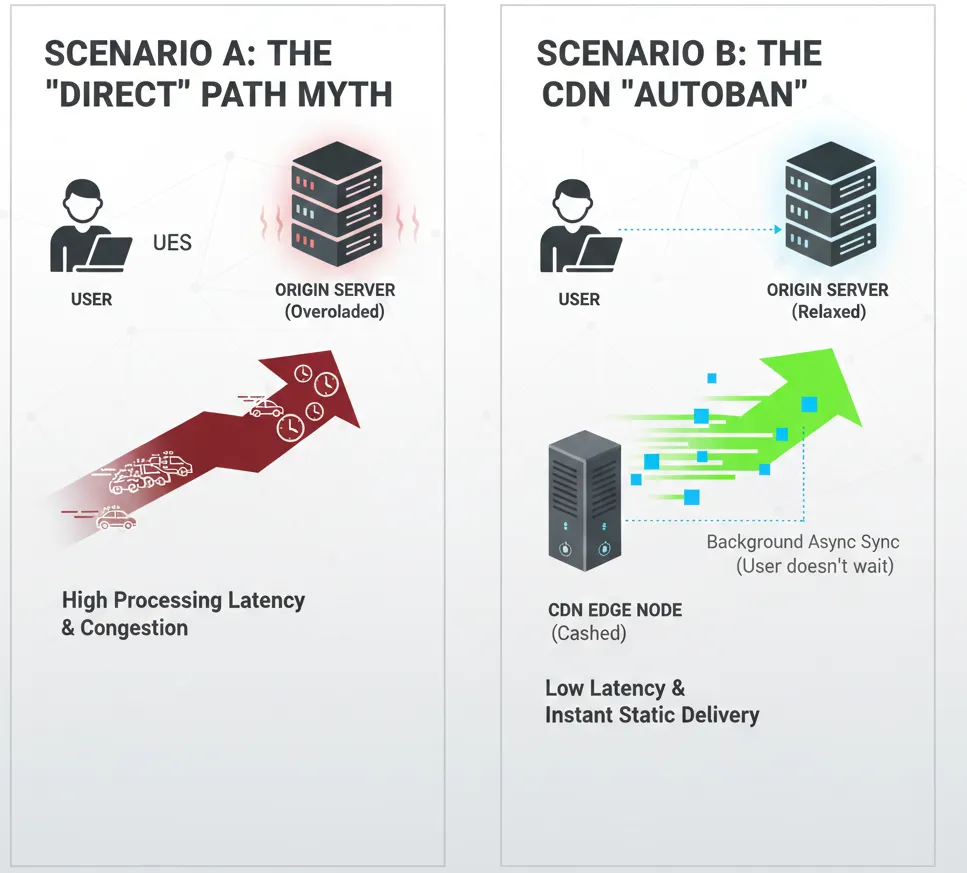
In basic networking theory, adding an extra hop can add latency. It’s like visiting your neighbor; why would you go to the post office first?
So many teams connect local users directly to the origin. The logic: remove intermediaries to keep the path “pure” and fast.
But that napkin model ignores two real-world factors:
- Origin congestion: your server doesn’t just serve files. It also handles databases, business logic, authentication, and background work. Making it deliver every image and JS bundle is like asking the chef to also be the waiter.
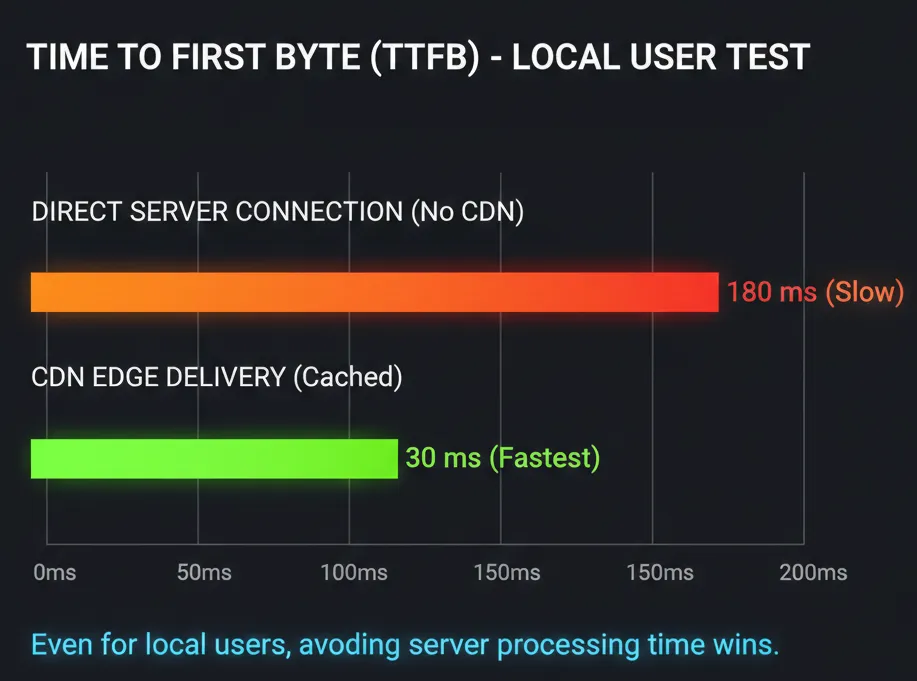
- Delivery negotiation and connection efficiency: physical distance may be short, but browsers still need to negotiate connections and download many files efficiently. The difference between an average setup and an optimized one is huge.
So the real question isn’t “what’s the shortest route?” It’s “which highway has less traffic?”
Sometimes taking the ring road (a CDN) is faster than driving through downtown (a saturated origin), even if the route is technically longer.
The 3 reasons a CDN helps (even when your users are local)
1) It protects your origin (and keeps it available)
Even if geography isn’t the bottleneck, reliability often is. A CDN can absorb traffic spikes (marketing campaigns, product launches, seasonal peaks) and reduce load on the origin.
It’s also a strong layer for mitigation against DDoS attacks and those are not “enterprise-only” problems anymore. If you want a concrete reference, Cloudflare publishes frequent public reports like their Cloudflare DDoS Threat Report.
2) It improves real user performance metrics
Performance isn’t only about “distance”. What matters is how quickly users can see and interact with your content.
Google’s Core Web Vitals are often discussed in SEO contexts, but they’re fundamentally UX metrics. A CDN can help by speeding up static delivery, improving caching, and reducing pressure on the origin.
And when we say latency, we’re not just talking about physical kilometers. Connection setup and warm connections matter too. A practical starting point is Google’s guidance on preconnecting to critical origins: Preconnect to required origins.
3) It makes scaling simpler than “tuning the origin forever”
At some point, you either scale the origin (more CPU, more bandwidth, more instances, more ops), or you offload static delivery to a network optimized for it. A CDN is a clean way to offload the repetitive work and keep your origin focused on what only it can do.
When you don’t need a CDN (yes, really)
It would be irresponsible to say every web project needs a CDN. Even with clear benefits, there are scenarios where the configuration overhead doesn’t justify the marginal gains.
If you fit one of these profiles, you can likely skip it for now:
- Intranets and corporate networks: if your app is only used inside the office or via a corporate VPN, users are already “on the local highway.” Forcing traffic out to the internet and back through a CDN can be counterproductive.
- Early-stage MVPs: if you’re validating an idea and you have 50 users/day, don’t waste time tuning cache rules and invalidations. Focus on product-market fit. When you’re ready to optimize, our team can help. Start with the contact form.
- Highly dynamic, private dashboards: if your app is mostly real-time private data with minimal static payload, a CDN acts more like a proxy than a cache. You still get security benefits, but the speed gains can be limited.
Recommendations: which CDN should you choose?
If you’ve decided that, even with a local audience, you want better origin protection, lower CPU load, and stronger reliability, here are strong options depending on your profile.
1) Cloudflare (best free tier + security)
For many teams, it’s the default choice. Cloudflare is not only a CDN; it’s also a security layer.
- Best for: startups, blogs, local businesses, and anyone who wants strong security without paying a fortune.
- Why it’s great: generous free tier, powerful rules, and strong ecosystem.
- Pricing: free to start; paid plans as you grow.
2) BunnyCDN (excellent performance/price)
If you want speed with a clean interface and straightforward pay-as-you-go billing, Bunny is a strong contender.
- Best for: developers who want to pay for what they use and avoid complex AWS billing.
- Why it’s great: fast, affordable, and easy to operate.
- Pricing: usage-based (great for predictable static workloads).
3) AWS CloudFront (deep AWS integration)
If you’re already living inside AWS (S3, EC2, ALB, Lambda), CloudFront becomes a natural choice.
- Best for: medium/large teams already standardized on AWS.
- Why it’s great: tight integration and advanced controls.
- Pricing: can be cost-effective, but you must watch data transfer costs.
Honorable mention: Vercel / Netlify
If you use Next.js or modern stacks, you might already be using a CDN “by default.” Platforms like Vercel and Netlify bundle edge caching as part of the hosting experience.
Conclusion: don’t obsess over geography
In 2026, a CDN is not just about “bringing content closer.” It’s about protecting your origin, handling spikes, improving real user metrics, and making your infrastructure resilient.
My advice: start simple. If you’re on modern hosting, check if you already have CDN capabilities included. If not, Cloudflare or Bunny are excellent places to start, even if your users are on the same street as your server.
Not sure which setup fits your case? Leave a note. Or better, consult us via the contact form and we’ll analyze your stack and traffic patterns with you.